Highlighted Obbies in Obby Builder
Curator-picked courses next to Trending — and how to stay off Unlisted.
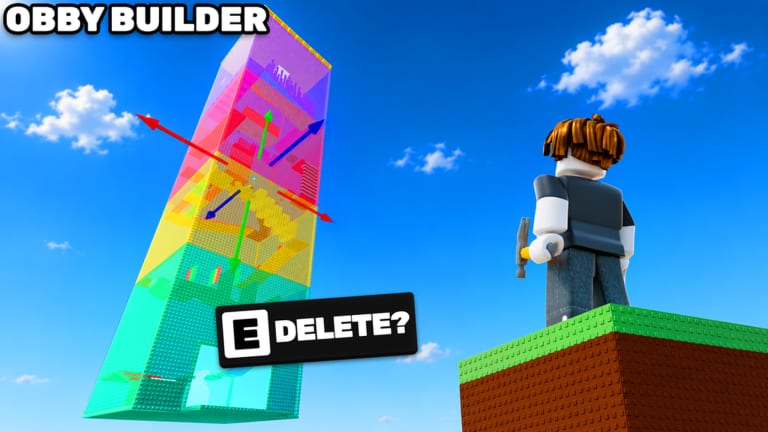
The current Obby Builder latest-updates block leads with Highlighted Obbies: curator-picked builds spotlighted alongside Trending. That sentence is the whole public spec. There is no published rubric, no vote threshold, and no calendar. This page explains what that means in practice, how it differs from likes and leaderboards, and what you can actually control on your slot.
Obby Builder Studio last pushed the live place on 5 September 2026. The rest of the description still lists slot codes, custom thumbnails, likes, leaderboards, Trending, co-op, and Restore Data. Highlighted did not replace those. It added a second discovery rail. If your plot is Unlisted, neither rail can see it. Turn that off before you hunt a curator.
Highlighted versus Trending versus likes
Trending is the automatic list. Likes and recent play push a slot there. Leaderboards sit next to that loop. Highlighted is curator-picked and shown alongside Trending, not instead of it. A course can trend without being Highlighted. A Highlighted course can sit next to weaker Trending entries because a person chose it.
Likes still matter. The Got a Like badge has about an 8.4% win rate. That badge is “someone liked your obby,” not “you are Highlighted.” Do not wait for a curator to teach you checkpoints. Build a finishable line, copy a slot code, and follow get featured for likes first.
Custom thumbnails help both rails. A thumbnail that matches the live lighting and the first jump beats a random skybox. Set it in the Slots UI. Details on sharing live on slot codes.
What you can control
You can control Unlisted, the thumbnail, checkpoint spacing, killbrick telegraph, one-way mover fairness, signs, and whether the slot code you paste is the version you meant to publish. You cannot control which staff or curator account clicks Highlighted. Build as if Trending is the job and Highlighted is a bonus.
Play other Highlighted courses. Steal spacing, not themes. Note where they put rest pads after spinners. Note whether lighting hides the path. Then apply that on your plot using lighting, movers, and emotes only after the line is fair.
Co-op does not submit a plot for you. The slot owner publishes. Agree who hits Unlisted and who copies the code. If a partner overwrites the Highlighted candidate, use Restore Data before you rebuild.
What Unlisted actually does
The documented Unlisted setting keeps obbies private from loading and featured lists. That includes Highlighted. Use it for drafts, lighting experiments, and co-op wip sessions. Turn it off when you want discovery. A plot that stays Unlisted after you “finished” is a plot nobody can pick.
Loading still works if someone has the slot code. Friends can paste it. Randoms on Trending cannot. If you want farm cash from strangers, you need the plot listed. Cash from beating courses is easier when your own slot is also findable.
After a discovery drop
When the game page mentions Highlighted, recopy your slot code, check Unlisted, refresh the thumbnail, and playtest without coils. Then leave the plot listed for a real 10-player server. Do not buy Taller, Longer, and Wider in a panic because a curator list appeared. Size passes help a course that already gets likes. They do not apply to Highlighted by themselves. Rank those spends on gamepasses.
Watch latest update for the live bullet list. This page will not invent a curator username or a like cutoff. If the studio publishes rules, they will show up on the Roblox page and the group, linked from the links hub.
A realistic Highlighted checklist
Finishable first jump. Checkpoint before the first spinner. One-way mover with a rest pad. Lighting that keeps the path brighter than the pit. Thumbnail that matches. Unlisted off. Slot code copied. One friend playtest. Then wait. Build the next course while you wait. Highlighted is a spotlight, not a salary.
Frequently Asked Questions
Quick answers to the most common Obby Builder questions.
Is Highlighted the same as Trending?
No. Trending is automatic. Highlighted is curator-picked and shown beside Trending. Likes still help. See get featured for the like path.
Can an Unlisted plot be Highlighted?
Unlisted is documented as hidden from loading and featured lists. Publish the slot first. Sharing steps are on slot codes.
Do I need a size gamepass to get Highlighted?
No. Fair layout beats empty size. Buy an axis only with a plot-size plan after people already finish the current footprint.
Where do I see the official Highlighted blurb?
On the live Roblox description, summarized on latest update. This wiki does not invent curator rules.
Will emotes get me Highlighted?
Unlikely. Keep emotes at the finish. Motion and lighting tips are on lighting, movers, and emotes.